
AI made receipt scanning much better at reading messy documents. It also changed how the errors look.
An older template-based OCR tool that couldn't read a smudged total usually gave you an empty field. Annoying, but you noticed. A model-based extractor in the same spot tends to give you a number. The number is formatted correctly, sits next to correctly read fields, and nothing flags it.
Beancount's write-up on AI receipt scanning has a good example: a crumpled gas station receipt read as $84.17 when the paper said $34.17, with no low-confidence warning attached. If you are a bookkeeper, that is a $50 error that survives until a bank reconciliation fails. If you are building an expense product, it is a bug your users find before you do.
You can keep using AI extraction. What has to change is trusting a single extracted number without checking it against the rest of the same document.
Where the wrong numbers come from
Bad totals usually fall into a few groups.
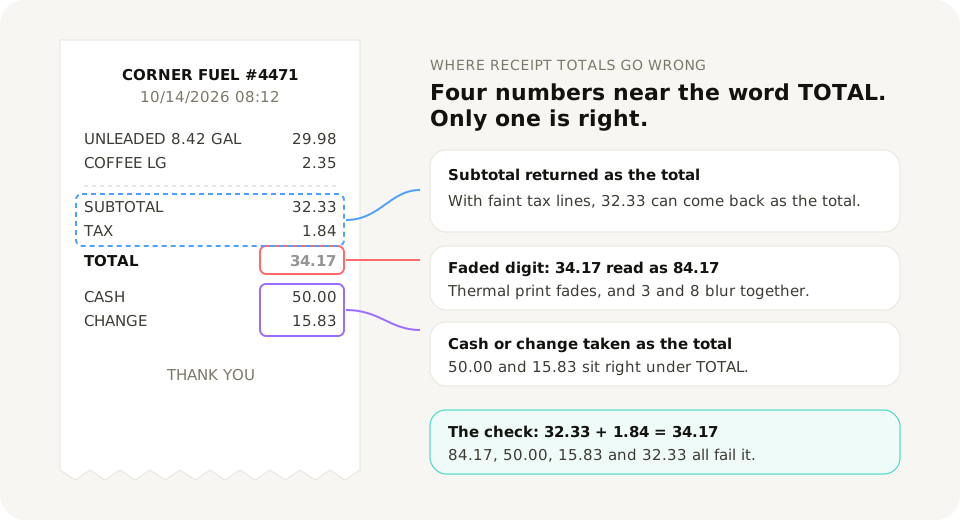
Some digits look alike. On faded thermal paper, 3 and 8, 1 and 7, 5 and 6, and 0 and 8 blur together. A decimal point can vanish into a crease, which turns 12.50 into 1250.
Some lines look like the total. A cash receipt can show TOTAL 34.17, CASH 50.00 and CHANGE 15.83. Restaurant receipts add a pre-tip total, a tip line and a final total written by hand. Some invoices show a balance carried forward or an amount already paid. All of these are numbers near the word "total".
Subtotal and total get swapped. When the tax line is faint or missing, the extractor can return the pre-tax amount as the total.
Models fill in gaps. Ask a language model for a field the document doesn't clearly show and it may infer one from context. That's useful for the merchant name on a receipt with a torn header. It's dangerous for a tax amount.
Formats drift. Dates like 03/04/2026 mean different days in the US and Europe. Amounts like 1.234,56 and 1,234.56 are the same number written two ways. A reader that guesses the wrong convention returns a valid-looking value that is off by months or by a factor of a thousand.
While building DocuParse API, I parsed and hand-checked more than 500 real receipts and invoices. The documents that pulled accuracy down were the ones you would expect from the list above: blurry or dark photos, handwriting, crumpled receipts and unusual layouts. Those are the documents the checks below are for.
Six checks that catch most of it
None of these needs machine learning. They use the fact that a receipt or invoice contains the same information more than once: the total equals the parts, the lines equal the subtotal, the dates relate to each other. When the extraction is wrong, those relationships usually break.
The code below assumes the fields come back as they do from DocuParse API: amounts as two-decimal strings, dates as YYYY-MM-DD, missing values as null. Adjust the field names for whatever tool you use.
1. The arithmetic check
Subtotal, minus discount, plus tax, plus shipping, should equal the total. Allow a cent or two for rounding.
from decimal import Decimal

def d(value):
    return Decimal(value) if value not in (None, "") else None

def check_arithmetic(doc, tolerance=Decimal("0.02")):
    subtotal, tax, total = d(doc["subtotal"]), d(doc["tax"]), d(doc["total"])
    if subtotal is None or total is None:
        return None  # not enough data to check
    expected = subtotal - (d(doc["discount"]) or 0) + (tax or 0) + (d(doc["shipping"]) or 0)
    return abs(expected - total) <= tolerance
This single check catches swapped subtotals and totals, most misread digits in either number, and the "cash tendered" mistake, because 50.00 rarely equals the subtotal plus tax.
Use Decimal, not floats, for money. 0.1 + 0.2 is not 0.3 in floating point, and you don't want rounding noise failing good documents.
2. The line items check
The line totals should add up to the subtotal. On receipts where prices include tax, they add up to the total instead, so accept either.
def check_line_items(doc, tolerance=Decimal("0.05")):
    lines = [d(item["line_total"]) for item in doc.get("line_items") or []]
    lines = [x for x in lines if x is not None]
    if not lines:
        return None
    line_sum = sum(lines)
    targets = [d(doc["subtotal"]), d(doc["total"])]
    return any(t is not None and abs(line_sum - t) <= tolerance for t in targets)
The tolerance is wider here because per-line rounding adds up. If a document has many lines, scale it.
3. The tax check
If the document states a tax rate, tax divided by subtotal should be close to it. If it doesn't, the effective rate should at least fall in a range that's possible where you buy things.
def check_tax(doc, max_rate=Decimal("30")):
    subtotal, tax = d(doc["subtotal"]), d(doc["tax"])
    if not subtotal or tax is None:
        return None
    effective = tax / subtotal * 100
    if doc.get("tax_rate"):
        return abs(effective - d(doc["tax_rate"])) <= Decimal("0.5")
    return Decimal("0") <= effective <= max_rate
Set max_rate to the highest rate you could realistically pay. Combined US sales tax rates rarely go past about 12%, while some VAT countries reach the mid twenties, so a German VAT invoice and a Texas fuel receipt need different limits. If you only buy in one place, you can tighten this to the exact rates that apply there. Documents with several rates on different lines need the line-level vat_rate instead.
4. The date check
A document dated in the future, or years before you started the business, is almost always a misread. A due date before the issue date is too.
from datetime import date, timedelta

def check_dates(doc, oldest=date(2020, 1, 1)):
    if not doc.get("date"):
        return None
    issued = date.fromisoformat(doc["date"])
    if issued > date.today() + timedelta(days=1) or issued < oldest:
        return False
    if doc.get("due_date") and date.fromisoformat(doc["due_date"]) < issued:
        return False
    return True
This also catches most day-month swaps that land in the future. The ones that land in the past need the next check.
5. The vendor history check
You already know roughly what each vendor charges. A coffee shop receipt for $480 or a monthly software invoice ten times its usual amount should be looked at, even if the arithmetic adds up.
from statistics import median

def check_vendor_history(doc, history, factor=3):
    # history: list of past totals (Decimal) for the same merchant and currency
    if len(history) < 3 or not doc.get("total"):
        return None
    typical = median(history)
    return d(doc["total"]) <= typical * factor
The same idea works for currency. If a vendor has billed you in EUR twenty times and this document says USD, check it.
6. The required fields check
Some fields must exist for the document to be usable. A receipt without a total or a date can't go into the books, whatever else was read.
def check_required(doc, required=("merchant", "date", "total", "currency")):
    return all(doc.get(field) for field in required)
Put them together and route the failures
Each check returns True (passed), False (failed) or None (not enough data to run). Run them all and send any document with a failure to a review list. Missing data is worth recording too, because a document where nothing could be checked is not the same as one that passed everything.
Store the reasons with the document. "Arithmetic didn't add up" tells the reviewer where to look, and over a few weeks the reasons show you patterns, such as one supplier whose layout always trips the tax check.
The review itself should be quick: show the original image next to the extracted fields, highlight the ones involved in the failed check, and let the person correct and approve.
What the extractor can do for you
Some tools run checks like these themselves. DocuParse API runs checks 1 and 2 on every document (line items against the subtotal, subtotal plus tax against the total), then an AI model reviews the document and corrects the fields it finds wrong. If something still doesn't line up, the response says needs_review: true, so the flagged_by_extractor line above costs you nothing to add. On the 500+ hand-checked documents it is tested on, the result is 97% field-level accuracy on merchant, number, date, tax and total, and the receipt OCR API page lists the fields it returns. It's still worth running your own checks on top, especially the vendor history one, because only you know what your vendors normally charge.
When you compare extraction tools, ask how each one handles a field it can't read. A tool that returns null and a review flag is easier to build on than one that always returns a value. The OCR vs AI comparison and the post on using a general AI model for invoices go into how different approaches fail.
A short checklist
- Never post an extracted amount to the books without at least the arithmetic check.
- Use
Decimalfor money. - Keep the original image linked to every extracted row, so review is quick.
- Review the failures, not everything.
- Reconcile against bank and card statements monthly. It catches what all the checks miss, including receipts that never got scanned.
This post is part of the guide to automating receipt and invoice data entry. To run these checks against real output, Sign up free for 20 documents a month with full API access, or upload a receipt to the demo and look at the JSON first.